Robot WB: A Robot Simulation Workbench for FreeCAD
This summer I worked on the FreeCAD Google Summer of Code 2026 project “Reviving and modernising the Robotic Workbench” (350h), mentored by Carlo Dormeletti (onekk), Furkan & Pieter Hijma. The project set out to modernise FreeCAD’s built-in Robot workbench, and along the way became something bigger: Robot WB, a brand-new robot simulation workbench, developed as an addon.
- Proposal: Application Doc
- Code: nishendra3/RobotWB(commits)
- PRs: TODO
- Documentation: project wiki
What the workbench does
You take an ordinary CAD file, run it through the robot creator wizard, and get a “robot” object which you can move with sliders, do FK/IK by dragging its tool, and create and move robot on taught trajectories, all inside FreeCAD, without needing an external simulator.
From the proposal to an addon
The proposal targeted the built-in Mod/Robot module: URDF import,
joint-space trajectory export, a KDL library refresh, and removing the
hard-coded 6-axis limit. The direction of the project however changed,
considering that now we have good kinematics support also in python. Keeping
the code in python would allow easier entry for new contributors and it
would also help us to clean the exisiting FreeCAD codebase of old library
that is no longer needed there. The goals in this new WB were the same: robots
of any DOF, easy robot definition, trajectory tooling with multi robot support.
Features built over the summer
Define Robot
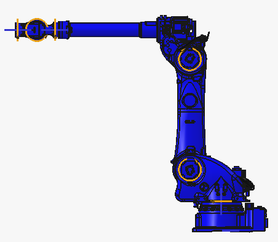
A four-step wizard (import parts, insert them, define joints, review) that converts an Assembly into a robot object. Joints get axes, limits, and directions; the robot roots at an editable base frame so it can be placed anywhere in the scene. Revolute and prismatic joints are supported as of now.
Trajectories
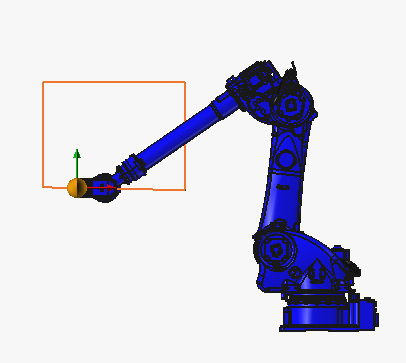
Waypoints can be taught and played back with point-to-point (PTP) and linear (LIN) motion types, and a trajectory player syncs playback across multiple robots.
Animate Robot
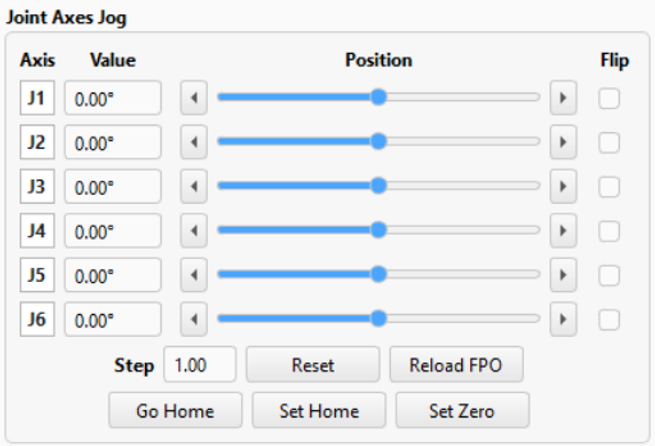
Per-joint sliders for forward-kinematic posing, with live joint-limit enforcement and joint markers in the 3D view.
Define Tool and inverse kinematics
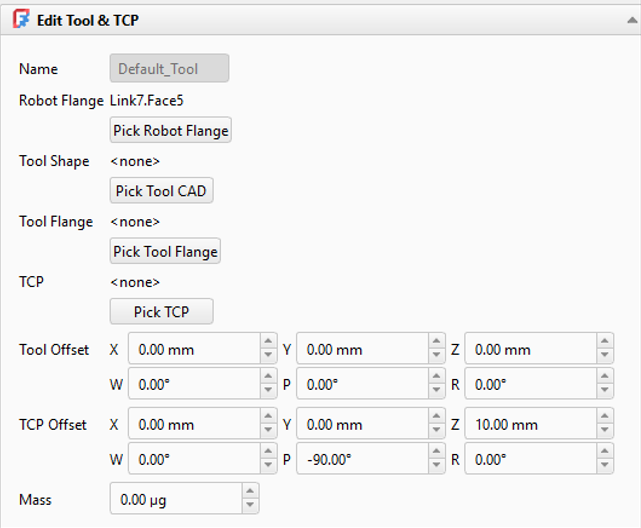
A tool can be attached to the flange with a configurable TCP. Dragging the TCP solves IK and poses the whole chain. The default solver is a damped-least-squares backend; pinocchio, tesseract-robotics, and ikpy are optional alternatives.
Multi-Robot Control
One panel to jog every robot in the document, which useful for cells with several robots working together.
Scripting API
Everything above is scriptable from Python: building robots, posing joints, solving IK, and running trajectories without touching the GUI.
Timeline
| When | Milestone |
|---|---|
| early May | Ported my prototype code into the project, core refactor |
| 20 May | Tool + TCP support |
| 18 Jun | Forward/inverse kinematics |
| 13 Jul | Prismatic joints |
| 27 Jul | Multi-Robot Control |
| 7–10 Aug | Trajectories: PTP, then LIN motion |
| 12 Aug | Scripting API |
| mid-Aug | UI polish, bug-fixes, documetation wiki |
State of the work
All six workbench features work today; development history is in my commits (45+ commits, May–August 2026). Nothing is merged into FreeCAD itself yet, the project moved to the addon path and is not yet mature enough for merge. The route into users’ hands is the FreeCAD Addon Manager.
Left for after GSoC: Refining UI based on user-feedback, collision and reachability envelopes, shared trajectories, multiple-tools per trajectory, import of URDF files, export to vendor-specific formats
Challenges and lessons
- It was my first large codebase. learning FreeCAD’s App/Gui split, FeaturePython objects, and the new Assembly workbench internals.
- Pivoting from the proposal’s patching the C++-module plan to designing a new workbench from scratch, with the scope decisions that came with it.
- Incorporation of the different UI changes based on user feedback provided useful insights.
Acknowledgements
Thanks to Carlo for the steady reviews and for seeding the project, and to the FreeCAD mentors Furkan and Pieter & the community for answering my questions all summer.